• Get started with Security Cloud Control Firewall Management
  • How To Request a Security Cloud Control Tenant
  • Sign in to Security Cloud Control
  • Manage Tenants and Users
  • Onboard devices in Security Cloud Control Firewall Management
  • Manage Firewall administration in Security Cloud Control Firewall Management
  • Onboard devices in Security Cloud Control Firewall Management
  • Manage objects
  • About Dynamic Attributes Connector
  • Configure the Dynamic Attributes Connector
  • Dynamic firewall
  • Use Dynamic Objects in Access Control Policies
  • Troubleshoot the Dynamic Attributes Connector
  • Onboard Secure Firewall ASA
  • Configure Secure Firewall ASA
  • Secure Firewall ASA Security Policy Management
  • Monitor Secure Firewall ASA Events
  • Monitor device health metrics
  • Use Cisco Secure Cloud Analytics Portal
  • Upgrade Secure Firewall ASA
  • Troubleshoot Secure Firewall ASA
  • Onboard a Firewall Threat Defense Device
  • Migrate Threat Defense to Cloud-Delivered Firewall Management Center
  • Configure Cloud-Delivered Firewall Management Center-Managed Secure Firewall Threat Defense
  • Introduction to AgenticOps insights
  • Introduction to Agent Workforce
  • Monitor Cloud-Delivered Firewall Management Center-Managed Threat Defense Device Events
  • FTD Dashboard
  • Analyze and Remediate Security Policy Anomalies with Policy Analyzer and Optimizer
  • Integrate Catalyst SD-WAN Manager with Security Cloud Control
  • Onboard Catalyst SD-WAN Manager
  • Configure Next-Generation Firewall Capabilities of Catalyst SD-WAN Manager
  • Monitor Catalyst SD-WAN Events
  • Onboard an On-Premises Firewall Management Center
  • Configure On-Premises Firewall Management Center-Managed Threat Defense Devices
  • Onboard an Umbrella Organization
  • Configure an Umbrella Organization
  • Onboard Cisco Meraki MX devices
  • Configure Cisco Meraki
  • Onboard AWS VPC
  • Configure AWS VPC
  • Onboard Cisco IOS Devices
  • Configure Cisco IOS
  • Onboard an SSH Device
  • Configure SSH Devices
  • Establish Site-to-Site VPN connection using Security Cloud Control Firewall Management
  • Establish Remote Access VPN connection using Security Cloud Control Firewall Management
  • Configure Firewall for Universal Zero Trust Network Access
  • Manage device configuration
  • Manage onboarded device settings
    • Changing a device's IP address in Security Cloud Control Firewall Management
    • Changing a device's name in Security Cloud Control Firewall Management
    • Export a list of devices and services
    • Export device configuration
    • External links for devices
      • Create an External Link from your Device
      • Create an External Link to ASDM
      • Create an External Link for Multiple Devices
      • Edit or Delete External Links
      • Edit or Delete External Links for Multiple Devices
    • Bulk reconnect devices to Security Cloud Control Firewall Management
    • Moving devices between organizations
    • Device certificate expiry detection
    • Update Meraki MX connection credentials
    • Write a device note
    • Delete a device from Security Cloud Control Firewall Management
    • Manage security devices
    • Back up Firewall Threat Defense devices
    • Manage Firewall Threat Defense devices through Security Cloud Control Firewall Management
    • Security devices overview
    • Security Cloud Control Firewall Management labels and filtering
    • Use Security Cloud Control Firewall Management search functionality
    • Security devices overview
    • Security Cloud Control Firewall Management labels and filtering
    • Use Security Cloud Control Firewall Management search functionality
  • Use the Security Cloud Control Command Line Interface Tool (CLI)
  • Manage CLI Templates
  • Migrate Firewalls with the Migration Tool in Security Cloud Control
  • Events in Security Cloud Control
  • Security Analytics and Logging Licenses
  • Secure Event Connectors
  • Monitor Catalyst SD-WAN Events
  • View Events in Security Cloud Control Firewall Management
  • Use Cisco Secure Cloud Analytics Portal
  • Monitor Remote Access Virtual Private Network Sessions from Secure Firewall ASA and Firewall Threat Defense
  • Monitor and report change logs, workflows, and jobs
  • Smart Licensing Dashboard
  • Troubleshooting
  • FAQ and support
  • Security and Internet Access
  • Terraform
  • Open Source and 3rd Party License Attribution
  • Cisco AI Assistant User Guide

External links for devices

You can create a hyperlink to an external resource and associate it with a device you manage with Security Cloud Control. You could use this feature to create a convenient link to the local manager of one of your devices (Adaptive Security Device Manager (ASDM) for ASA). You could also use it to link to a search engine, documentation resource, a corporate wiki, or any other URL that you choose. You can associate as many external links with a device as you want. You can also associate the same link with multiple devices at the same time.
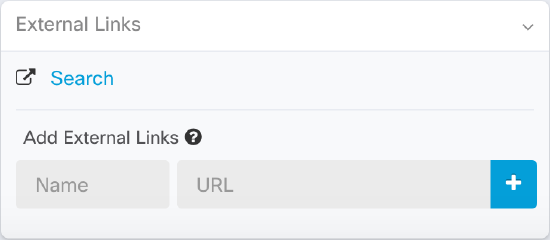
The links you create can reach anywhere, but your company's security requirements do not change. For example, if you ordinarily need to be connected to your corporate network, by being on-premises or through a VPN connection to reach a particular URL, those requirements remain. If your company blocks specific URLs, those URLs continue to be blocked. URLs that are not restricted continue to not be restricted.

Location Variable

We have created the {location} variable that you can incorporate in your URLs. This variable will be populated with the IP address of your device. For example,
https://{location}
should reach the ASDM for your ASA .
  • Create an External Link from your Device
  • Create an External Link to ASDM
  • Create an External Link for Multiple Devices
  • Edit or Delete External Links
  • Edit or Delete External Links for Multiple Devices
Copyright © 2026, Cisco Systems, Inc. All rights reserved.